Email and calendar sync (Pro)
Connect Gmail or Outlook and your calendar, work the Review inbox, stop tracking a sender, and disconnect.
Let your inbox keep it up to date
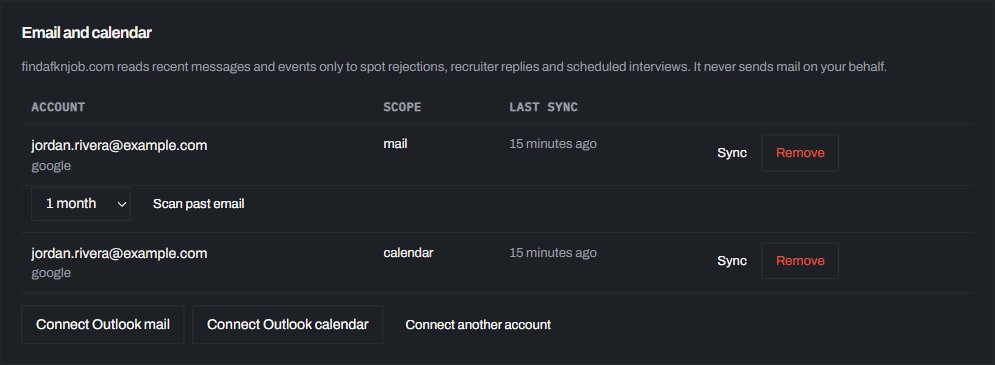
On Pro, connect Gmail or Outlook and your calendar. Confirmations, recruiter replies, rejections and interviews attach themselves to the right application, and the people at the company are saved with it. A real recruiter who writes to you is shown as the recruiter; a team mailbox, like a talent acquisition address, is saved as a contact. When you track an email from a company, FAFJ looks back through the past year of mail from that company (and from its recruiting firm, if one is involved), so earlier replies, interviews and rejections join the application. A rejection updates the status but stays on your list until you archive it. To bring in what you applied to before you joined, click Scan past email under the mailbox in Settings and choose 1, 3 or 6 months: FAFJ reads the confirmations and rejections from that time and fills in the applications you already sent.
Anything unclear waits in your Review inbox instead of guessing: add it to an application (only the company is needed, and its name is looked up from the sender’s domain), paste the posting’s link and click Process to fill in the rest, or tick several to add or delete them at once. A job already on your list is joined, never added twice. Mail from someone you never want tracked, like a job alert? Click Don’t track this sender (or tick several and click Don’t track senders): their messages leave the Review inbox and later ones are skipped. Settings lists them under Senders you don’t track, with Track again.
When you disconnect a mailbox or calendar in Settings, FAFJ asks whether to keep what it added or delete it: its emails or meetings on your timelines, its Review inbox messages and the people saved from it. Your applications stay either way. The text of emails and meetings is kept for 12 months after their date, then deleted; the timeline entry (subject, date and sender) stays. We read mail only to find messages about your job search, and never send mail for you.