Emails and files
Track a recruiter’s email with the extension, keep attachments and your own files with the job, and file size limits.
Keep every email and file with the job
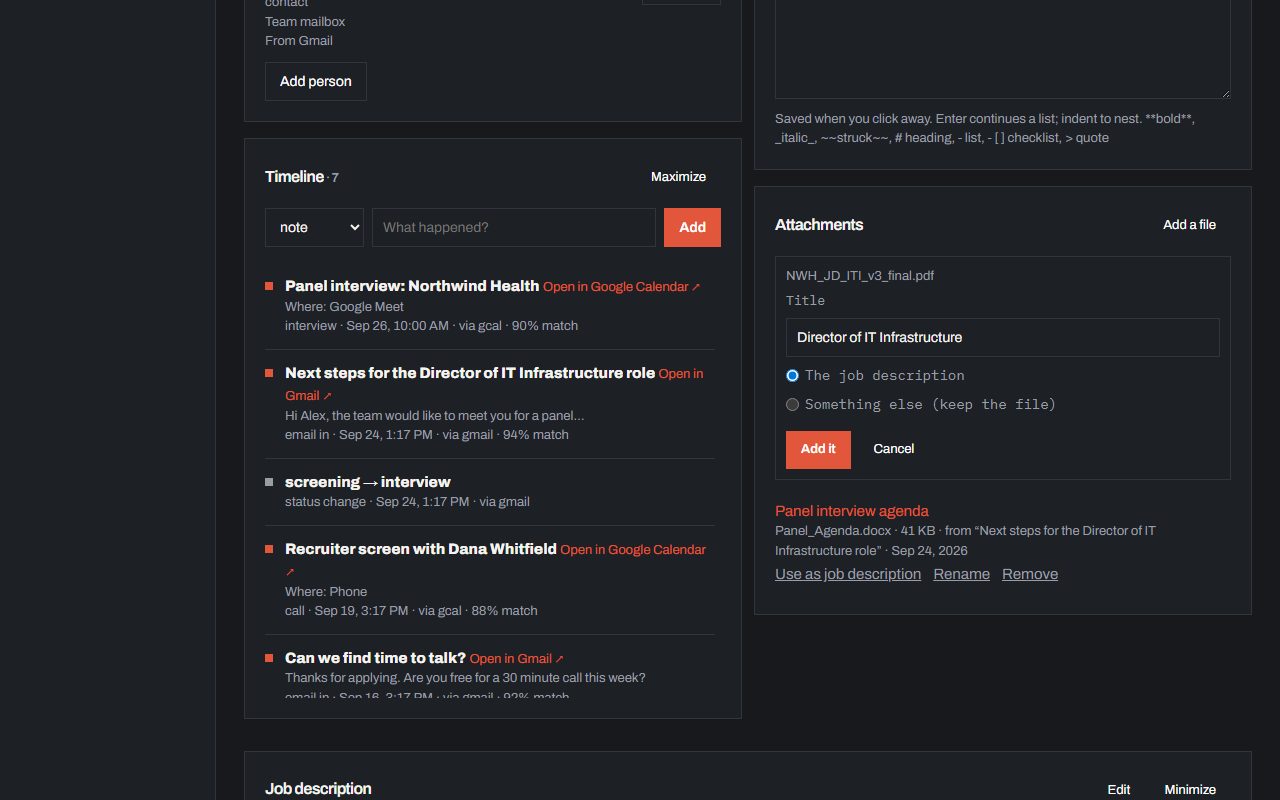
Reading a recruiter’s email in Gmail or Outlook? Open the Chrome extension and click Track this email to put it on the right application, on any plan. In Gmail it lists the email’s attachments: tick the ones to keep and say whether each is the Job description or Something else. Prep material, like a working session prompt, an assignment or an agenda, is never taken for the job itself. On the application’s page, Add a file asks the same question. A job description’s text fills in the description, role, location and pay that are missing, and the file is kept; anything else is just kept. Each file is titled from its own heading or its file name, and you can Rename it, or later pick Use as job description. The list shows five files and scrolls, with Maximize for the rest. Files can be up to 10MB each; Free keeps 25MB in all, Pro 500MB. An email with a link to the job (a LinkedIn job alert or recruiter message, or a Greenhouse, Lever, Ashby or Workday posting) fills in the description, pay and location an application is missing, whether you track the email or it arrives by sync.